A dispatch register is an important operational record used to track documents, samples, parcels, commercial goods and transport consignments sent by a company.
It helps the business answer questions such as:
What was dispatched?
When was it dispatched?
To whom was it sent?
Which invoice or delivery challan covered it?
Which courier or transporter handled it?
What was the docket, airway bill or LR number?
Has it been delivered?
Who received it?
How much freight was charged?
Is any shipment delayed, damaged or returned?
A properly maintained dispatch register connects the company’s:
Order → Invoice → Packing → Dispatch → Transit → Delivery → Proof of Delivery
It is especially important for pharmaceutical, Ayurvedic, nutraceutical, diagnostic, manufacturing, trading and distribution companies where batch traceability and timely delivery matter.
What Is a Dispatch Register?
A dispatch register is a chronological record of everything sent outside the company.
It may cover:
Saleable goods
Product samples
Promotional materials
Legal documents
Agreements
Invoices
Original certificates
Cheques
Purchase documents
Replacement goods
Returned goods
Expired stock
Inter-branch transfers
Goods sent for testing
Goods sent for job work
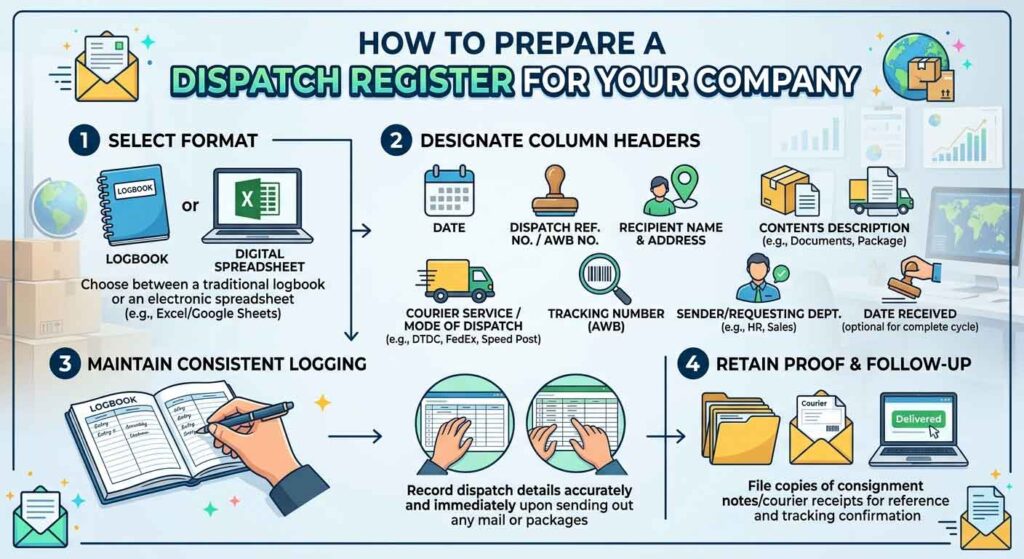
The register may be maintained:
Manually in a bound register
In Microsoft Excel
In Google Sheets
In accounting software
In ERP software
In courier software
In warehouse-management software
Why Is a Dispatch Register Important?
1. Shipment Tracking
The docket, airway bill, LR or GR number helps track a consignment.
2. Customer Follow-Up
The company can tell the customer:
Dispatch date
Transporter
Tracking number
Expected delivery
Current status
3. Proof of Dispatch
The register provides a record showing when and through which service the parcel was sent.
4. Freight Verification
Courier and transport bills can be compared with:
Weight
Number of packages
Destination
Agreed rate
Actual charges
5. Complaint Investigation
If a party reports:
Non-delivery
Short delivery
Damage
Leakage
Wrong product
Wrong batch
the dispatch register helps investigate the shipment.
6. Stock Reconciliation
The register can be compared with:
Sales invoices
Delivery challans
Stock register
Finished-goods register
Packing records
7. Batch Traceability
For medicines and healthcare products, the register can record:
Batch number
Manufacturing date
Expiry date
Quantity dispatched
This helps during complaints, returns and recalls.
8. Proof of Delivery Control
The company can track whether signed proof of delivery has been received.
9. Internal Accountability
The register identifies:
Who prepared the parcel
Who checked it
Who handed it to the transporter
When it left the premises
Types of Dispatch Registers
A company may maintain one combined register or separate registers for different activities.
Common registers include:
Courier and document dispatch register
Transport or logistics dispatch register
Local delivery register
Pharma goods dispatch register
Sample dispatch register
Inter-branch transfer register
Return and replacement dispatch register
Export dispatch register
For a small business, one Excel workbook with separate worksheets is usually sufficient.
Recommended Excel Workbook Structure
Create the following sheets:
Sheet 1: Courier and Documents
For:
Letters
Agreements
Certificates
Cheques
Small parcels
Product samples
Sheet 2: Transport and Commercial Goods
For:
Cartons
Cases
Large consignments
Wholesale orders
Intercity transport
Sheet 3: Local Delivery
For goods delivered through:
Company employee
Local vehicle
Delivery executive
Hired tempo
Sheet 4: Pending Deliveries
Automatically displays consignments that have not been delivered.
Sheet 5: Freight Summary
Summarises:
Courier-wise freight
Transporter-wise freight
Monthly dispatch expense
Destination-wise charges
Sheet 6: Masters
Maintain standard lists for:
Parties
Cities
Courier companies
Transporters
Dispatch modes
Status options
Using master lists helps reduce spelling variations and duplicate entries.
Courier Dispatch Register Format
A detailed courier register may contain the following columns:
Column
Heading
A
Serial Number
B
Dispatch Date
C
Dispatch Time
D
Party Name
E
Contact Person
F
Mobile Number
G
Complete Address
H
Destination
I
State
J
PIN Code
K
Material or Document Description
L
Invoice/Challan/Reference Number
M
Invoice Date
N
Courier Name
O
Docket/AWB Number
P
Number of Packages
Q
Actual Weight
R
Chargeable Weight
S
Freight Basis
T
Freight Amount
U
Freight Paid By
V
Expected Delivery Date
W
Actual Delivery Date
X
Delivery Status
Y
Receiver Name
Z
POD Received
AA
Prepared By
AB
Checked By
AC
Remarks
Basic Courier Dispatch Register
A very small business may begin with:
Sr. No.
Date
Party
Destination
Material
Reference No.
Courier
Docket No.
Weight
Charges
Status
Remarks
However, the detailed format is better where dispatch volume is high.
Transport Dispatch Register Format
For goods sent through a transporter, use columns such as:
Column
Heading
A
Serial Number
B
Dispatch Date
C
Party Name
D
Destination
E
Invoice Number
F
Invoice Date
G
Invoice Value
H
Delivery Challan Number
I
E-Way Bill Number
J
E-Way Bill Valid Up To
K
Number of Cases
L
Number of Loose Packages
M
Total Weight
N
Transporter Name
O
Transporter ID/GSTIN
P
LR/GR/Bilty Number
Q
LR/GR Date
R
Vehicle Number
S
Driver Name
T
Driver Mobile
U
Freight Terms
V
Freight Amount
W
Expected Delivery
X
Actual Delivery
Y
Delivery Status
Z
POD Number or Link
AA
Shortage or Damage
AB
Claim Number
AC
Prepared By
AD
Checked By
AE
Remarks
Important Terms Used in Transport Dispatch
LR Number
LR generally means Lorry Receipt number.
It is issued by the transporter against the goods accepted for transportation.
GR Number
GR commonly means Goods Receipt number.
It serves a purpose similar to an LR number.
Bilty Number
“Bilty” is a commonly used trade expression for the transporter’s goods receipt or consignment note.
AWB Number
AWB means Air Waybill number.
It is commonly used for:
Courier
Air cargo
Express delivery
Docket Number
A unique number issued by a courier or transporter for tracking the shipment.
POD
POD means Proof of Delivery.
It may show:
Delivery date
Receiver name
Signature
Stamp
Delivery photograph
OTP confirmation
Pharma and Healthcare Dispatch Register
Pharmaceutical, Ayurvedic, nutraceutical and diagnostic companies should maintain additional product details.
Recommended columns include:
Heading
Purpose
Product Name
Identifies the dispatched item
Dosage Form
Tablet, capsule, syrup, oil, cream, etc.
Pack Size
10×10, 60 tablets, 200 ml, etc.
Batch Number
Essential for traceability
Manufacturing Date
Product manufacturing date
Expiry Date
Product expiry
Quantity
Number of packs dispatched
Free Quantity
Scheme or promotional quantity
Saleable/Sample
Distinguishes commercial stock from samples
Storage Condition
Normal, cool, refrigerated, protected from light
Invoice Number
Commercial reference
E-Way Bill Number
Where applicable
Transporter
Delivery service
Delivery Status
Pending, delivered, damaged, returned
Complaint Reference
Links any complaint to the batch and shipment
Recommended Pharma Dispatch Format
Sr. No.
Date
Party
Invoice No.
Product
Pack
Batch No.
Expiry
Sale Qty.
Free Qty.
Cases
Transporter
LR No.
E-Way Bill
Status
POD
Remarks
Why Batch and Expiry Must Be Recorded
Batch and expiry records help with:
Market complaints
Product recalls
Expiry returns
Distributor claims
Replacement
Batch-wise sales analysis
Investigation of quality problems
Identification of affected customers
Where the invoice software already records batch and expiry details, the dispatch register may link to the invoice rather than duplicate every line. However, the data should remain easily retrievable.
Sample Dispatch Register
Medical samples and promotional items should preferably be tracked separately.
Recommended columns:
Date
Employee or MR name
Headquarters
Doctor or institution
Product name
Batch number
Expiry
Quantity
Promotional material
Authorization
Courier details
Acknowledgement
Remarks
Do not mix physician samples with saleable stock without proper identification.
Document Dispatch Register
For original documents, maintain:
Sr. No.
Date
Recipient
Address
Document Description
Original/Copy
Reference No.
Courier
AWB No.
Delivery Date
Acknowledgement
Remarks
Examples of documents may include:
Agreements
Licences
Certificates
Cheques
Legal notices
Product dossiers
Tender documents
Laboratory reports
Purchase orders
Mention whether the document is:
Original
Photocopy
Certified copy
Confidential
Local Delivery Register
Goods delivered through company staff or a local vehicle may not have a courier docket number.
Use columns such as:
Date
Delivery number
Party name
Address
Invoice number
Number of packages
Employee name
Vehicle number
Departure time
Delivery time
Receiver name
Signature
Cash collected
Payment deposited
Remarks
A signed invoice or delivery challan can serve as proof of receipt.
Inter-Branch Transfer Register
For stock movement between company locations, record:
Transfer date
From location
To location
Stock-transfer challan number
E-way bill number
Product
Batch
Expiry
Quantity
Transporter
Vehicle number
Dispatch confirmation
Receipt confirmation
Difference
Remarks
The receiving branch should confirm:
Number of packages received
Quantity
Damage
Shortage
Date and time
Return and Replacement Dispatch Register
Returned or replacement goods should not be entered as ordinary sales dispatch without identification.
Maintain:
Return reference number
Original invoice number
Customer name
Product
Batch
Expiry
Return reason
Replacement quantity
Credit-note number
Delivery challan
Transporter
Disposal or quarantine status
Common return reasons include:
Expiry
Near expiry
Damage
Leakage
Wrong product
Quality complaint
Recall
Excess supply
Goods Sent Without Sale
Goods may move for reasons other than sale, such as:
Job work
Testing
Exhibition
Demonstration
Repair
Inter-branch transfer
Return
Destruction
Replacement
Such movements may require a delivery challan and, where applicable, an e-way bill.
The dispatch register should clearly mention the purpose:
Sale
Stock transfer
Job work
Sample
Return
Replacement
Testing
Exhibition
Destruction
Essential Documents Before Dispatch
Before goods leave the premises, check whether the shipment requires:
Tax Invoice
Used for a taxable supply of goods.
Bill of Supply
Used in applicable cases such as exempt supply or composition-scheme transactions.
Delivery Challan
Commonly used where goods move without an immediate sale, subject to GST requirements.
E-Way Bill
Generally required for applicable movement above the prescribed consignment value and in certain special cases.
E-Invoice
Applicable where the supplier falls within the currently notified e-invoicing category.
Packing List
Useful for showing:
Number of cases
Product quantities
Gross weight
Net weight
Package identification
Transport Receipt
Examples:
LR
GR
Bilty
AWB
Railway receipt
Cargo receipt
Regulatory Documents
Depending on the goods, these may include:
Drug invoice
Temperature record
Test report
Certificate of Analysis
Dangerous-goods declaration
Export documents
E-Way Bill Details in the Dispatch Register
Recommended e-way bill fields include:
E-way bill number
Generation date
Generation time
Valid-until date
Invoice or challan number
Consignment value
Transporter ID
Vehicle number
Distance
Cancellation status
Extension status
Do not enter only “E-way bill generated.”
The actual number and validity should be available.
A better pending count that ignores blank rows is:
=COUNTIFS(B2:B1000,”<>”,X2:X1000,”<>Delivered”)
Total Freight for a Courier
If the courier name is in column N:
=SUMIF(N2:N1000,”Courier Name”,T2:T1000)
Delayed Shipment Alert
=IF(AND(W2=””,TODAY()>V2),”FOLLOW UP”,””)
Excel Data Validation
Create drop-down menus for:
Courier name
Transporter
State
Freight terms
Delivery status
POD status
Prepared by
Checked by
This prevents entries such as:
Blue Dart
Bluedart
BLUE DART
Blue-Dart
from appearing as separate couriers in reports.
Conditional Formatting
Use conditional formatting to highlight:
Red: Delayed
Orange: In Transit beyond expected date
Green: Delivered
Yellow: POD Pending
Red: E-way bill nearing expiry
Red: Shipment without docket number
Yellow: Freight amount missing
Do not depend only on colour. The written status should also be visible.
Protecting the Excel Register
Important controls include:
Lock formula cells.
Protect column headings.
Restrict deletion rights.
Maintain daily backup.
Store the file in a shared controlled folder.
Record who updated the file.
Avoid multiple uncoordinated copies.
Use date and time in a standard format.
A dispatch register should not be overwritten at the end of each month without retaining historical records.
Naming the File
Use a clear file name:
Dispatch_Register_2026-27.xlsx
Avoid names such as:
New Excel
Final
Final Latest
New Final 2
Dispatch Updated
Monthly files may be named:
Dispatch_Register_April_2026.xlsx
Dispatch_Register_May_2026.xlsx
A single annual workbook is generally better for reporting if dispatch volume is manageable.
Daily Dispatch Procedure
Step 1: Receive Approved Order
Confirm:
Customer
Products
Quantity
Price
Payment status
Delivery address
Step 2: Prepare Invoice or Challan
Verify:
GSTIN
Address
Product description
Quantity
Tax
Batch and expiry, where applicable
Step 3: Pick and Pack Goods
Check:
Correct product
Correct batch
Adequate shelf life
Correct quantity
Secure packaging
Step 4: Prepare Packing List
Mention:
Case numbers
Contents
Weight
Dimensions
Step 5: Generate E-Way Bill Where Applicable
Enter the correct:
Invoice
Value
Transport mode
Transporter
Vehicle
Distance
Step 6: Enter Dispatch Register
Make the entry before the goods physically leave the premises.
Step 7: Hand Over to Courier or Transporter
Obtain:
Stamped receipt
AWB
LR
GR
Vehicle details
Step 8: Send Dispatch Details to Customer
Share:
Invoice
Transporter
Docket or LR number
Number of packages
Tracking details
Expected delivery
Step 9: Track Delivery
Review pending shipments daily.
Step 10: Obtain POD
Save the POD against the dispatch entry.
Step 11: Close the Dispatch
Mark as delivered only after reliable delivery confirmation.
Dispatch Checklist
Before handing over the parcel, verify:
Correct party
Correct address
Correct products
Correct quantity
Correct batch
Adequate expiry
Invoice enclosed or transmitted
E-way bill generated, where applicable
Number of cases counted
Cases properly sealed
Fragile or storage labels applied
Courier receipt obtained
Register entry completed
Customer informed
Pharma Cold-Chain Dispatch
Products requiring controlled temperature need additional records.
Examples may include certain:
Vaccines
Insulins
Biological products
Diagnostic kits
Temperature-sensitive medicines
Record:
Required temperature range
Pre-dispatch storage temperature
Packing date and time
Ice packs or coolant used
Data logger number
Dispatch temperature
Transport mode
Delivery temperature
Temperature excursion
QA review
A normal courier register is not sufficient for cold-chain products.
Damage and Shortage Register
When a delivery problem occurs, record:
Dispatch reference
Invoice
Party
Transporter
Product
Batch
Quantity dispatched
Quantity received
Shortage
Damage
Photographs received
Complaint date
Claim amount
Claim status
Replacement
Credit note
Closure date
Freight Reconciliation
At the end of the month:
Obtain the courier or transporter bill.
Match every docket or LR with the dispatch register.
Compare billed and recorded weight.
Check destination.
Check agreed tariff.
Identify duplicate charges.
Identify return charges.
Verify GST.
Approve the bill.
Record payment.
Monthly Dispatch Report
A useful monthly report should show:
Total consignments
Total invoice value
Total packages
Total weight
Total freight
Freight as percentage of sales
Courier-wise shipments
Transporter-wise shipments
Destination-wise shipments
Delivered shipments
Delayed shipments
Returned shipments
Damage claims
Average delivery time
POD pending
Useful Performance Indicators
On-Time Delivery Percentage
On-time deliveries ÷ Total delivered consignments × 100
Damage Percentage
Damaged consignments ÷ Total consignments × 100
Return-to-Origin Percentage
Returned consignments ÷ Total consignments × 100
Freight Percentage
Total freight ÷ Net sales value × 100
Average Delivery Days
Total delivery days ÷ Number of delivered consignments
Manual Register vs Excel vs Software
Handwritten Register
Advantages
Easy to begin
No computer required
Useful as a gate register
Limitations
Difficult to search
Difficult to analyse
Entries may be unclear
No automatic reminders
Corrections can be problematic
POD links cannot be stored
Excel or Spreadsheet
Advantages
Customisable
Searchable
Low cost
Formulas and filters
Easy reports
Suitable for small and medium businesses
Limitations
Depends on disciplined data entry
Risk of accidental deletion
Limited multi-user control
Can become slow with excessive data
ERP or Dispatch Software
Advantages
Invoice integration
Stock integration
Courier integration
Barcode scanning
User permissions
Automatic tracking
Reports and alerts
Limitations
Setup cost
Training
Customisation
Maintenance
Dependence on vendor support
When Should a Company Move from Excel to Software?
Consider software when:
Dispatches exceed approximately 20–30 consignments daily.
Multiple employees update records.
More than one warehouse is involved.
Batch and expiry tracking is complex.
Courier tracking needs automation.
Stock, invoice and dispatch data do not reconcile.
Management needs real-time reports.
Excel files are frequently duplicated or corrupted.
Common Mistakes in Dispatch Registers
Avoid:
Entering data after several days
Leaving docket numbers blank
Writing only the customer’s short name
Omitting invoice number
Omitting number of cases
Not recording freight
Marking goods delivered without POD
Mixing documents and commercial goods
Not recording batch and expiry
Using inconsistent status names
Deleting cancelled dispatch entries
Maintaining multiple uncontrolled Excel files
Not tracking return-to-origin shipments
Not checking e-way bill validity
Sending goods to an address different from the invoice without verification
Not reconciling courier bills
Corrections in the Dispatch Register
Do not silently overwrite important data.
For material corrections:
Retain the original entry where practical.
Record the corrected information.
Mention correction reason.
Record correction date.
Identify the person making the correction.
For a manual register:
Draw one line through the wrong entry.
Write the correct entry nearby.
Sign and date the correction.
Do not use correction fluid.
Retention of Dispatch Records
The company should define a written retention period based on:
GST requirements
Drug or food regulations
Contract terms
Internal quality procedures
Complaint and recall needs
Limitation and litigation risks
Records may include:
Dispatch register
Invoice
Delivery challan
E-way bill
LR or AWB
Packing list
POD
Temperature record
Complaint record
Freight invoice
Do not destroy dispatch records merely because the customer has paid.
Practical Answer
A reliable dispatch register should contain five groups of information:
1. Party Details
Party name
Address
Destination
Contact person
Mobile number
2. Commercial Details
Order number
Invoice or challan number
Invoice value
GST and e-way bill reference
3. Shipment Details
Dispatch date
Number of cases
Weight
Courier or transporter
AWB, LR or GR number
Vehicle number
4. Delivery Details
Expected date
Actual date
Delivery status
Receiver
POD
5. Control Details
Prepared by
Checked by
Freight
Damage or shortage
Claim
Remarks
The best dispatch register is not the one with the greatest number of columns. It is the one that is updated consistently and can trace every consignment from invoice to delivery.
Frequently Asked Questions
1. Is a dispatch register compulsory?
A dispatch register is an important internal control record. Additional statutory documents such as invoices, challans, e-way bills and industry-specific records may be legally required depending on the transaction.
2. Can a dispatch register be maintained in Excel?
Yes. Excel or another spreadsheet is suitable for a small or medium business when it is backed up and properly controlled.
3. Is a courier docket number sufficient?
No. The register should also connect the docket number with the party, invoice, material, date and delivery status.
4. What is the difference between LR and GR?
Both are transporter-issued consignment references. Terminology varies by transporter and region.
5. Should batch numbers be recorded?
For pharmaceuticals, nutraceuticals and other batch-controlled products, recording or linking batch details is strongly recommended for traceability.
6. Should an e-way bill number be recorded?
Yes, where an e-way bill applies. Recording its number and validity helps verify compliance and investigate shipment problems.
7. What is POD?
POD means Proof of Delivery. It confirms that the consignee received the shipment.
8. How should delayed dispatches be tracked?
Use expected delivery date, status and pending-days formulas. Review the pending-delivery report daily.
9. Should documents and goods use the same register?
They can, but separate worksheets usually provide better control.
10. Who should maintain the dispatch register?
A designated dispatch, warehouse, accounts or logistics employee should enter the information. Another responsible person should review important commercial dispatches.
Final Thoughts
A dispatch register should not end when the goods are handed over to the transporter.
The complete dispatch cycle is:
Order received → Goods picked → Invoice prepared → Goods packed → Dispatch recorded → Transport receipt obtained → Customer informed → Shipment tracked → Delivery confirmed → POD saved → Freight reconciled
A properly designed register improves:
Customer service
Delivery follow-up
Freight control
Stock reconciliation
Batch traceability
Complaint handling
Internal accountability
Small businesses can begin with a well-designed Excel workbook and move to ERP software as dispatch volume increases.
Looking for Ayurvedic Franchise or Distribution Opportunities?
Looking to start an Ayurvedic franchise, become a distributor, or launch your own herbal product range?
Elzac Herbal India offers:
Ayurvedic & Herbal Product Range
Franchise & Distribution Opportunities
Third-Party Manufacturing Services
Product Development Support
Marketing Guidance
PAN India Business Opportunities
Whether you are an entrepreneur, retailer, distributor, or healthcare professional, our team can help you explore the right business opportunity in the growing Ayurvedic sector.
Ajay Kamboj is an entrepreneur and business owners associated with many Ayurvedic and Pharmaceutical start-ups. With years of experience in Ayurvedic product marketing, pharmaceutical distribution, franchise development, and client relationship management, he regularly shares practical business insights based on real-world experiences. His articles focus on business growth, entrepreneurship, customer management, and lessons learned from the healthcare and wellness industry.






Leave a Reply
You must be logged in to post a comment.