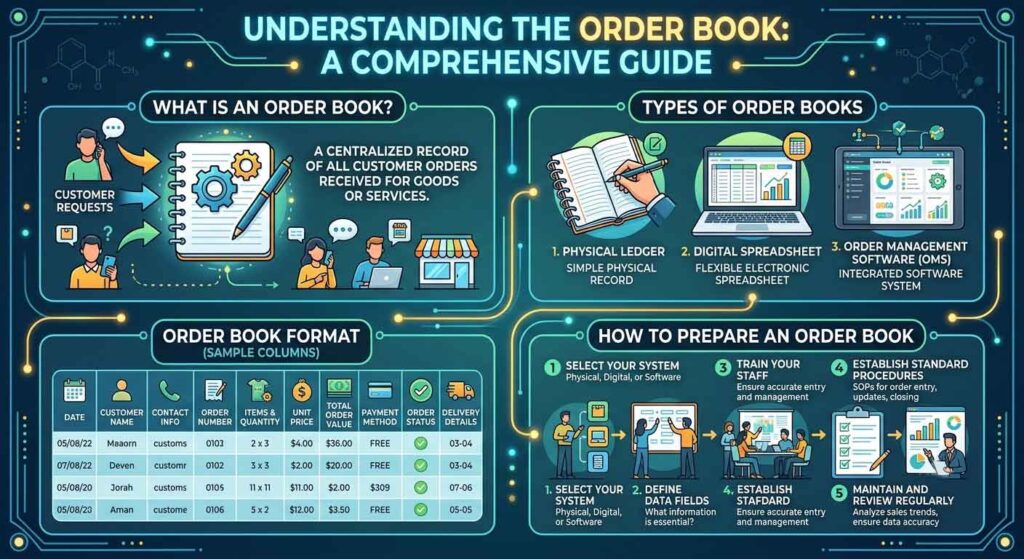
An order book is used to record orders received from new and existing customers. It helps a business track what a customer ordered, when the order was received, the agreed price, dispatch status, payment terms and pending quantities.
Order books are commonly used by:
Medical representatives
Sales representatives
Pharma distributors
PCD and franchise companies
Third-party manufacturers
C&F agents
Stockists
Wholesalers
Retail businesses
Office and dispatch teams
An order book may be maintained manually, in a printed format, in Excel or through order-management and inventory software.
Quick Answer
An order book is a physical or electronic record containing customer and product-wise order details.
A good order book should answer the following questions:
Who placed the order?
When was it received?
Which products were ordered?
What quantity was ordered?
What rate was agreed?
Has the order been confirmed?
Has it been invoiced and dispatched?
Is any quantity still pending?
Has the payment been received?
What Is an Order Book?
An order book can be defined as:
A document or electronic register in which customer orders are entered, processed, tracked and maintained from receipt to completion.
It may record orders received through:
Field representatives
Telephone calls
WhatsApp
Email
Company website
Distributor portal
Purchase orders
Online marketplaces
Direct office communication
An order book should not be treated merely as a notebook. When maintained properly, it becomes an important sales, inventory and customer-service record.
Why Is an Order Book Important?
An order book helps a business:
Avoid missed orders
Reduce dispatch mistakes
Track pending products
Check previous customer purchases
Maintain agreed rates
Coordinate sales, billing and dispatch
Monitor representative performance
Estimate stock requirements
Follow up on pending payments
Analyse frequently ordered products
Resolve customer disputes
For pharmaceutical companies, an order book is especially useful because one order may include several brands, pack sizes, schemes, free goods and batch-specific requirements.
Difference Between an Order Book and a Purchase Order
These terms are related but not identical.
Purchase Order
A purchase order is generally issued by the customer to the supplier. It contains the items, quantities, prices and commercial terms requested by the buyer.
Order Book
An order book is maintained by the supplier or sales team to record and track orders received from customers.
The purchase order is the customer’s instruction, while the order book is the company’s internal order record.
Difference Between an Order Book and an Invoice
An order book records the customer’s requirement before billing.
An invoice is generated after the company confirms the products and quantities being supplied.
An order may be:
Fully invoiced
Partly invoiced
Kept pending
Cancelled
Modified
Rejected because of credit or stock issues
Therefore, order-book quantity and invoice quantity may not always be identical.
Important Parts of an Order Book
The format may differ according to business requirements, but a complete order book generally contains the following sections.
1. Company Details
The top section may include:
Company name
Company logo
Registered or marketing address
Contact number
Email address
Website
GSTIN
Drug licence details, where relevant
2. Order Details
Every order should have a unique identity.
Include:
Order number
Order date
Order-received time
Mode of order
Sales representative’s name
Expected dispatch date
Order priority
A unique order number makes follow-up and record searching easier.
Example:
ORD-2026-000125
3. Customer Details
Include relevant customer information such as:
Customer or firm name
Contact person
Mobile number
Billing address
Delivery address
City or station
State
GSTIN
Drug licence number, where applicable
Customer code
Customer category
Transport details
Preferred bank or payment mode
Customer categories may include:
Distributor
Stockist
PCD franchise partner
Retailer
Hospital
Institution
Third-party manufacturing client
4. Product Details
The product section may contain:
Serial number
Product code
Brand name
Generic name or composition
Dosage form
Packing
Ordered quantity
Free quantity
Total quantity
Rate
MRP
Discount
Scheme
GST rate
Taxable value
Remarks
For third-party manufacturing orders, additional fields may include:
Batch size
Product specification
Packing specification
Artwork status
Advance received
Production status
Testing status
Expected completion date
5. Commercial Terms
A good order book should clearly mention:
Advance payment
Credit period
COD
Bank payment
Transport charges
Freight responsibility
Insurance
Scheme or free goods
Special discount
Minimum order condition
Delivery commitment
Commercial terms should not remain dependent on verbal discussion.
6. Order Status
Order status allows the team to understand the current stage of every order.
Common status options include:
New
Under review
Awaiting payment
Confirmed
In production
Ready for billing
Partly invoiced
Fully invoiced
Dispatched
Partly dispatched
Delivered
On hold
Cancelled
Closed
7. Footer Section
A printed order book may include:
Customer’s signature
Representative’s signature
Order-entry staff signature
Approval signature
Date and time
Special instructions
Company terms and conditions
Types of Order Books
Order books can be classified into three main types:
Manual order book
Printed order book
Electronic order book
1. Manual Order Book
A manual order book may be a diary, register, notebook, pad or plain paper used to note customer orders.
Advantages
Simple to start
No software required
Low cost
Useful during field visits
Can be used without internet or electricity
Disadvantages
Higher risk of missing information
Difficult to search old orders
Handwriting may be unclear
Pages may be lost or damaged
Difficult to analyse sales
No automatic calculation
Duplicate entries may occur
Pending orders are difficult to monitor
A manual order book may be suitable for a very small business, but it should eventually be transferred to an electronic register.
2. Printed Order Book
A printed order book follows a fixed format prepared according to the company’s business requirements.
It may contain:
Original copy for company
Duplicate copy for customer
Triplicate copy for accounts or dispatch
Carbonless or NCR paper can be used to generate multiple copies.
Advantages
Professional appearance
Standard information on every order
Easier for representatives to use
Customer receives written confirmation
Signatures can be obtained
Reduces missing fields
Disadvantages
Requires printing expense
Corrections may look untidy
Old orders are difficult to search
Data still has to be entered into billing or inventory software
Updated formats require reprinting
3. Electronic Order Book
An electronic order book may be maintained using:
Microsoft Excel
Google Sheets
ERP software
CRM software
Inventory-management software
Mobile sales application
Distributor-management system
Accounting software
Advantages
Easy searching and filtering
Automatic calculations
Faster reporting
Status tracking
Easy sharing between departments
Customer purchase history
Pending-order analysis
Stock planning
Reduced duplicate work
Data backup
Sales representative analysis
Disadvantages
Requires training
Incorrect formulas may create errors
Access control is necessary
Data may be lost without backups
Software may involve a subscription cost
Internet may be required for cloud-based systems
Types of Order Books According to Business Use
Different businesses require different order-book formats.
Field Sales Order Book
Used by sales representatives during customer visits.
Common fields:
Customer name
Product
Packing
Quantity
Rate
Scheme
Signature
Expected supply date
Office Order Register
Used by office executives to record orders received through calls, email or WhatsApp.
It should include:
Customer code
Order source
Payment status
Stock status
Billing status
Dispatch status
Pharma Franchise Order Book
Used for PCD and monopoly franchise partners.
Additional fields may include:
Territory
Monopoly status
Promotional-input requirement
Free goods
Credit limit
Pending payment
Transport
Third-Party Manufacturing Order Book
Used to manage manufacturing orders placed by marketing companies.
It may include:
Product name
Composition
Batch size
Quantity
Packing type
Artwork approval
Packing-material status
Advance payment
Manufacturing schedule
Quality-control status
Dispatch date
Institutional Order Book
Used for hospitals, government institutions, tenders and bulk buyers.
It may include:
Purchase-order number
Tender number
Contract rate
Delivery schedule
Required documents
Inspection status
Supply deadline
How to Prepare a Printed Order Book
Step 1: Identify the Users
First decide who will use the order book:
Medical representative
Area sales manager
Office executive
Distributor
Manufacturing department
Dispatch team
Step 2: List the Required Fields
Do not add unnecessary fields. Include only the details required to process the order correctly.
Step 3: Decide the Number of Copies
Common options are:
Original plus duplicate
Original plus two copies
Original plus three copies
Step 4: Design the Layout
Keep the format clean and provide sufficient writing space.
The product table may contain:
S. No.
Product
Packing
Quantity
Free Qty.
Rate
MRP
Remarks
Step 5: Add Terms and Signatures
Include:
Payment terms
Freight terms
Delivery conditions
Customer signature
Representative signature
Step 6: Number Every Order Form
Use pre-printed serial numbers to prevent missing or duplicated order forms.
How to Prepare an Order Book in Excel
Maintain one Master Order Register and use filters, pivot tables or separate reports to view each customer’s orders.
Step 1: Create a Master Order Sheet
Create the following columns:
Column
Field
A
Order Number
B
Order Date
C
Customer Code
D
Customer Name
E
City
F
Sales Representative
G
Product Code
H
Product Name
I
Packing
J
Ordered Quantity
K
Free Quantity
L
Rate
M
Discount
N
Taxable Value
O
GST
P
Total Value
Q
Payment Status
R
Order Status
S
Invoice Number
T
Dispatch Date
U
Transport
V
Pending Quantity
W
Remarks
Each product in an order should preferably be entered as a separate row while keeping the same order number.
Step 2: Create a Customer Master
Prepare another worksheet containing:
Customer code
Customer name
Contact person
Phone number
Billing address
Delivery address
GSTIN
Drug licence number
State
Credit limit
Payment terms
Transport preference
Sales representative
Step 3: Create a Product Master
Include:
Product code
Brand name
Composition
Packing
MRP
Trade rate
GST rate
Current stock
Minimum stock
Product status
Step 4: Use Drop-Down Lists
Use Excel Data Validation to create drop-down lists for:
Customer name
Product name
Representative
Payment status
Order status
Transport
Priority
Drop-down lists reduce spelling differences and reporting errors.
Step 5: Add Basic Formulas
Total Quantity
Ordered Quantity + Free Quantity
Taxable Value
Ordered Quantity × Rate − Discount
GST Amount
Taxable Value × GST Rate
Order Value
Taxable Value + GST Amount
Pending Quantity
Ordered Quantity − Invoiced Quantity
Step 6: Add Order-Status Colours
Conditional formatting can help the team identify:
New orders
Pending payments
Partly dispatched orders
Delayed orders
Completed orders
Cancelled orders
For example:
Pending payment: highlighted
Delayed dispatch: highlighted
Completed order: highlighted
Cancelled order: highlighted
Step 7: Apply Filters
Filters allow you to view orders according to:
Customer
Date
Representative
City
Product
Payment status
Dispatch status
Pending quantity
Step 8: Create a Dashboard
An order dashboard may show:
Number of new orders
Total order value
Orders awaiting payment
Orders awaiting dispatch
Partly supplied orders
Cancelled orders
Top customers
Top products
Representative-wise orders
Step 9: Protect Important Cells
Lock cells containing formulas and master data to prevent accidental changes.
Step 10: Maintain Backups
Keep:
Daily backup
Weekly backup
Cloud copy
Restricted user access
Business order data should not remain on only one computer.
Sample Order-Book Format
Company Information
Company Name: __________________________ Address: _______________________________ Phone: _________________________________ Email: _________________________________
Order Information
Order No.: _____________________________ Order Date: ____________________________ Representative: ________________________ Expected Dispatch: _____________________
A proper order book should connect the sales, accounts, inventory and dispatch departments.
Stage 1: Order Received
The order is entered with complete customer and product information.
Stage 2: Commercial Verification
Check:
Rate
Discount
Scheme
Outstanding payment
Credit limit
Advance requirement
Stage 3: Stock Verification
Confirm whether:
Full stock is available
Partial stock is available
Product is out of stock
Product is under production
Stage 4: Order Confirmation
Send the customer a confirmation containing:
Confirmed products
Confirmed quantity
Rate
Expected dispatch
Payment terms
Stage 5: Billing
Generate the invoice against the confirmed quantity.
Stage 6: Dispatch
Record:
Dispatch date
Transporter
LR or tracking number
Number of boxes
Freight details
Stage 7: Delivery Follow-Up
Confirm whether the order was delivered safely and completely.
Stage 8: Closure
Mark the order as closed after:
Complete supply
Delivery confirmation
Pending-item resolution
Payment reconciliation
Important Controls for Pharma Order Books
Pharmaceutical order records may also need to consider:
Customer drug-licence details
Valid GST details
Restricted-product handling
Prescription-drug categories
Batch and expiry details
Cold-chain products
Product returns
Breakage and leakage
Expired or near-expiry stock
Schedule-specific records
Recall communication
The order book should support—but not replace—mandatory sales invoices, purchase records and statutory registers.
Common Mistakes While Maintaining an Order Book
Avoid the following mistakes:
Accepting an order without a customer code
Not recording the agreed rate
Missing payment terms
Writing unclear quantities
Confusing ordered and free quantities
Not checking previous outstanding payments
Not assigning a unique order number
Deleting cancelled orders
Failing to record partial supply
Not updating dispatch details
Maintaining different order records in different departments
Depending only on WhatsApp messages
Not keeping backups
A cancelled order should not be deleted. Its status should be changed to “Cancelled” along with the reason.
Advantages of an Electronic Order Book
An electronic order book allows a company to:
Check pending orders quickly
View customer purchase history
Track dispatch delays
Check old rates
Estimate future demand
Analyse fast-moving products
Monitor representative performance
Identify inactive customers
Reduce manual calculations
Prepare management reports
Coordinate between departments
Reduce the risk of lost order slips
Is Excel or Software Better?
Excel Is Suitable When:
The business is small.
The number of daily orders is limited.
One or two employees handle orders.
Inventory integration is not essential.
The team understands spreadsheets.
Order-Management Software Is Better When:
Several employees process orders.
The business has multiple locations.
Orders come through several channels.
Live stock visibility is required.
Billing and inventory must be integrated.
Customer-wise credit control is important.
Management requires dashboards and alerts.
A small business can begin with Excel and move to ERP or CRM software as order volume increases.
Final Thoughts
An order book is much more than a place to write customer requirements. It is the starting point of the complete sales and supply process.
A properly maintained order book helps connect:
Customer requirement
Sales approval
Payment verification
Stock planning
Billing
Dispatch
Delivery
Customer follow-up
Small businesses may begin with a printed format or Excel sheet. As the company grows, a centralised electronic order-management system becomes more useful.
The best order book is not the one with the most columns. It is the one that records all essential information and is updated consistently by every responsible department.
Frequently Asked Questions
1. What is an order book in sales?
An order book is a manual or electronic record used to enter and track orders received from customers.
2. Who uses an order book?
It may be used by sales representatives, medical representatives, distributors, office executives, billing staff, manufacturers and dispatch teams.
3. Is an order book the same as an invoice?
No. An order book records the customer’s requirement, while an invoice records the products that are actually billed and supplied.
4. Can an order book be maintained in Excel?
Yes. Excel is suitable for small and medium businesses when a properly structured master order register, customer master and product master are maintained.
5. Should every customer have a separate Excel sheet?
It is usually better to maintain one master order table and filter it by customer. Separate worksheets for every customer become difficult to manage as the business grows.
6. What is the most important field in an order book?
Every order should have a unique order number. Customer details, product quantity, rate, status and dispatch information are also essential.
7. Should cancelled orders be removed?
No. Cancelled orders should remain in the register with the status and cancellation reason recorded.
8. How can pending orders be tracked?
Include columns for ordered quantity, invoiced quantity, dispatched quantity, pending quantity and order status.
9. Can WhatsApp messages be treated as an order book?
WhatsApp may be used to receive orders, but the details should be transferred to a controlled order register or software for processing and tracking.
10. What is an order book for third-party manufacturing?
It records product specifications, quantity, batch size, artwork approval, packing-material status, advance payment, production progress and expected dispatch.
Looking for Ayurvedic Franchise or Distribution Opportunities?
Looking to start an Ayurvedic franchise, become a distributor, or launch your own herbal product range?
Elzac Herbal India offers:
Ayurvedic & Herbal Product Range
Franchise & Distribution Opportunities
Third-Party Manufacturing
Product Development Support
Marketing Guidance
PAN India Business Opportunities
Whether you are an entrepreneur, retailer, distributor, or healthcare professional, our team can help you explore the right business opportunity in the growing Ayurvedic sector.
Ajay Kamboj is an entrepreneur and business owners associated with many Ayurvedic and Pharmaceutical start-ups. With years of experience in Ayurvedic product marketing, pharmaceutical distribution, franchise development, and client relationship management, he regularly shares practical business insights based on real-world experiences. His articles focus on business growth, entrepreneurship, customer management, and lessons learned from the healthcare and wellness industry.







Leave a Reply Cancel reply
You must be logged in to post a comment.